Give Every Applicant a Clearer Path to Admission
Help prospective students navigate the admission process with a more organized digital experience—from application submission to status updates, document requirements, and the next steps.
Designed to reduce applicant friction and repetitive admissions phone calls by providing prospective students with self-service clarity at every milestone.
Why the Traditional Application Experience Frustrates Applicants
Applying to educational institutions is often fraught with uncertainty. When institutions rely on fragmented forms or disconnected communication, applicants face unnecessary friction.
Uncertainty About Application Progress
Applicants frequently submit admission forms into an informational void, leaving them unsure whether their application was received, verified, or shortlisted.
Repeated Calls & Inquiries to Admission Desks
Without self-service status tracking, candidates and parents repeatedly call admissions offices for routine updates that could easily be accessed online.
Confusion Regarding Required Documents
Unclear document checklists cause applicants to upload incorrect file formats or omit crucial certificates, stalling verification workflows.
Difficulty Understanding Required Next Steps
Uncertainty about interview schedules, counseling rounds, or provisional fee deadlines leads to eligible candidates missing critical enrollment windows.
Disconnected Application & Payment Experiences
Requiring applicants to navigate external payment links or visit campus cash counters creates disconnected records and manual reconciliation headaches.
How CampusIRIS Resolves Applicant Uncertainty
CampusIRIS provides a centralized digital environment where prospective students can fill forms, verify uploaded certificates, and track their application review status without needing to make repetitive follow-up calls to the admissions office.
Features Built for a Modern Applicant Experience
CampusIRIS provides colleges with an intuitive, self-service applicant environment that keeps prospective students informed and empowered throughout the intake cycle.
Online Applicant Registration
Frictionless Self-Service Sign-up
Create an applicant profile with verified email or mobile credentials, enabling candidates to begin and save their admission journey securely.
Key Highlights:
- Self-service applicant account creation
- Mobile and email verification workflows
- Save-and-resume application progress
- Secure candidate credentials and data protection
Digital Application Forms
Organized Multi-Step Data Collection
Collect personal background, guardian contacts, academic qualifying scores, and program preferences in a clear, step-by-step digital format.
Key Highlights:
- Step-by-step categorized application filing
- Academic history and test score entry
- Program and specialization preference selection
- Pre-submission review to prevent clerical errors
Application Status Tracking
Clear Visibility into Admission Stages
Keep applicants informed with milestone indicators showing whether their submission is under review, verified, shortlisted, or offered admission.
Key Highlights:
- Milestone-based application progress tracking
- Clear indicators for current review stage
- Clear status indicators for missing requirements
- Official provisional admission offer visibility
Structured Document Submission
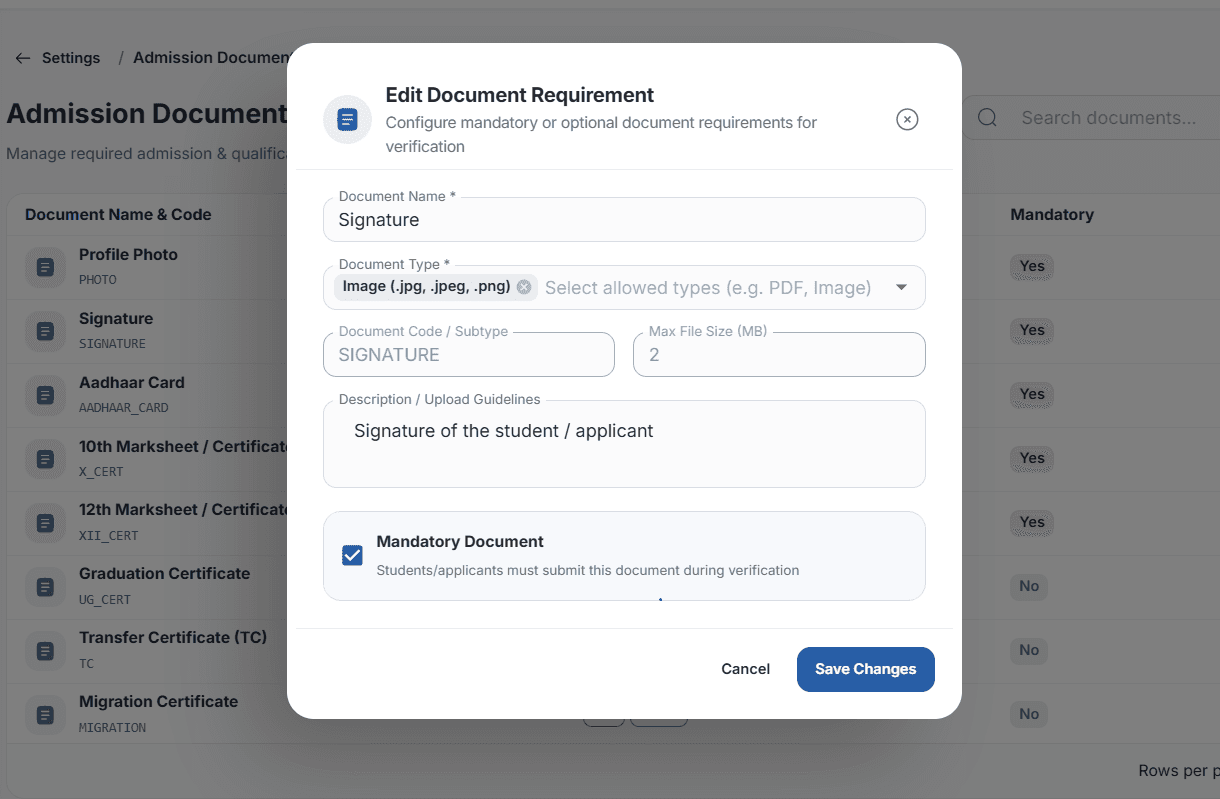
Paperless Digital Certificate Upload
Provide applicants with an organized digital vault to upload marksheets, certificates, category proofs, and identification documents.
Key Highlights:
- File upload support for PDF and image formats
- Prescribed document checklist per program requirements
- Clear document status indicators (Pending, Verified, Flagged)
- Re-upload options if a document requires correction
Application Fee Payments
Secure Online Payment Gateway
Support online fee collection for application forms and seat booking deposits through certified payment gateway integrations.
Key Highlights:
- Integrated checkout via UPI, netbanking, and cards
- Digital fee receipts generated upon confirmation
- Transaction status visibility
- Seamless credit mapping to student ledger in Finance module
Application Updates & Institutional Notices
Official Admission Circulars & Notices
Keep candidates informed on important admission announcements, verification updates, and fee deadlines through integrated institutional email communications.
Key Highlights:
- Submission confirmation records
- Document clearance and verification notices via email
- Interview and counselling schedule circulars
- Important deadline and fee schedule announcements
Mobile-Friendly Responsive Access
Convenient Multi-Device Usability
Engineered for responsive performance on smartphones, tablets, and desktop computers without requiring separate native app downloads.
Key Highlights:
- Responsive design optimized for mobile web browsers
- Touch-friendly form controls and file uploaders
- Consistent experience across operating systems
- Fast page load speeds on standard mobile connections
Admission Office Visibility
Bi-Directional Administrative Sync
Connect applicant submissions directly into internal staff workspaces, enabling officers to review applications and update statuses effortlessly.
Key Highlights:
- Immediate visibility for admission verification staff
- Applicant records sync with counselor workspaces
- Centralized audit history of review actions
- Direct handover to student registry upon enrollment
A Clear 5-Step Path from Discovery to Enrollment
A structured, transparent progression designed to guide applicants smoothly through every requirement without ambiguity.
Discover the Institution & Start Application
Prospective ApplicantThe prospective student accesses the college portal, creates a verified account, and initiates their admission application.
Register & Provide Required Information
Applicant / GuardianThe candidate fills out personal details, academic history, qualifying marks, and program preferences in the guided form.
Submit Application & Supporting Documents
ApplicantThe applicant uploads digital copies of required certificates, reviews their submitted data, and confirms official submission.
Complete Applicable Admission-Fee Payment
Integrated GatewayThe applicant pays the required application or provisional seat fee securely online, generating a digital receipt.
Follow Application Progress & Respond to Next Steps
Applicant & Admissions DeskThe candidate tracks application review progress, responds to any document clarification requests, and receives their offer status.
A Seamless Experience for Prospective Students & Parents
Empowering candidates with self-service clarity eliminates the stress and ambiguity of traditional college admissions.
More Organized Application Process
A structured, step-by-step layout guides candidates through personal, academic, and document requirements without overwhelming paperwork.
Clear Information About Required Actions
Applicants always know their exact next step, whether it is uploading an additional certificate, attending counseling, or paying fees.
Less Confusion During Document Submission
Clear file format specifications and status indicators ensure candidates upload the correct certificates the first time.
Convenient Multi-Device Access
Candidates can begin, save, and submit their application from any smartphone, tablet, or laptop at their convenience.
Transparent Progress Tracking
Real-time status tracking provides peace of mind, eliminating the anxiety of wondering whether an application is being processed.
How the Portal Complements Your Admissions Staff
By giving applicants clear visibility into their status, your internal admissions team can focus on meaningful counselling rather than repetitive clerical queries.
Reduce Repetitive Applicant Enquiries
Self-service status tracking drastically cuts down on repetitive phone calls and emails asking for routine application status confirmations.
Keep Applicant Information Organized
Replaces scattered emails and physical forms with standardized digital applicant records directly linked to course selections.
Connect Records with Internal Admissions
Submissions flow directly into counselor call queues and verification staff vaults without manual re-typing or data loss.
Visibility into Incomplete Applications
Admission heads can identify applicants who started a form but stalled, enabling staff to coordinate timely follow-up assistance.
Coordinated Staff Follow-Ups
Counsellors have full context on what documents and information the applicant has already submitted before initiating contact.
Connected to the Full CampusIRIS Admissions Suite
The Applicant Portal does not operate in a vacuum. It connects directly with your internal administrative modules to create a seamless operational ecosystem.
Enquiry & Lead Management
Capture prospective queries across marketing channels and guide qualified leads directly into the applicant portal.
Admissions Management Hub
The overarching platform connecting lead ingestion, counselor queues, application review, and seat allocations.
Document Verification
Administrative clearinghouse where verification officers inspect marksheets and approve candidate eligibility.
Seat & Intake Management
Real-time program capacity oversight to monitor confirmed admissions against approved merit and management quotas.
Admission Registration & Fees
Connect application fees and provisional seat booking deposits directly with student ledgers in the Finance module.
Explore the Applicant Interface
A preview of how prospective students interact with registration, form filing, document uploads, and application tracking.
Applicant Registration
Clean, secure sign-up interface allowing applicants to create a profile and verify contact details in seconds.
Application Form Filing
Structured form fields with real-time field validation to ensure complete, accurate personal and academic entries.
Document Submission Vault
Visual checklist interface indicating which documents are required, pending review, approved, or flagged.
Application Status Dashboard
Transparent milestone tracker showing the candidate’s active review stage and upcoming required actions.
Frequently Asked Questions About the Applicant Portal
Factual, transparent answers addressing self-service registration, document submission, mobile access, and fee integration.
Explore Admissions & Connected Institutional Solutions
CampusIRIS powers diverse institutional formats. Explore related admissions capabilities or view solutions tailored for colleges, schools, and coaching centres.
- Admissions Management Hub
Central admissions platform covering applications, verification, and fee desks.
- Document Verification & Seat Management
Staff verification desk for applicant marksheets, category proofs, and intake capacity.
- Enquiry & Lead Management
Capture prospective queries across marketing channels and guide leads.
- Finance & Fee Management
Student fee ledgers, installment schedules, and receipt generation.
- Academics & Student Management
Course curricula, batch allocations, and student records.
Make the Admission Journey Easier to Navigate
See how CampusIRIS can help your institution deliver a modern, transparent applicant experience while streamlining internal admissions administration.