Turn Student Enquiries into an Organized Admission Pipeline.
Capture prospective student enquiries, organize lead records, coordinate counsellor follow-ups, and track admission progress through CampusIRIS.
The Friction of Unorganized Student Enquiries
Without a centralized lead management system, institutions face predictable administrative friction: uncontacted leads, forgotten callbacks, and zero visibility into enquiry outcomes.
Enquiries Arriving Through Disconnected Channels
Walk-ins, website forms, inbound phone calls, and marketing campaigns land across paper diaries and separate spreadsheets, resulting in uncontacted student enquiries.
Incomplete Prospective Student Records
Counsellors repeatedly ask the same questions about academic scores and course preferences because initial enquiry details are not logged in a central profile.
Unclear Lead Ownership & Accountability
Without clear counsellor allocation, team members either duplicate outreach efforts or assume someone else is handling the prospective applicant.
Missed & Delayed Counsellor Follow-Ups
Counsellors lack scheduled callback alerts and notes from previous discussions, causing prospective students to lose momentum during decision-making.
Limited Visibility into Enquiry Status
Admissions heads cannot determine how many enquiries are new, in-conversation, qualified, or ready to register without manual evening status checks.
Inconsistent Reporting Across Courses & Branches
Evaluating enquiry volume by academic program, branch location, or lead source requires hours of manual spreadsheet compilation.
How CampusIRIS Brings Order to Enquiries
CampusIRIS replaces fragmented files with an organized enquiry repository. Every lead is captured, assigned an owner, and tracked through structured follow-up cadences so your admission team knows exactly which prospective students need attention.
Features Built for Everyday Enquiry Administration
CampusIRIS provides practical, grounded tools that give admission heads and counsellors complete control over prospective student interactions.
Enquiry Capture & Source Tracking
Record Every Student Touchpoint
Log prospective student enquiries manually at the campus reception or capture them automatically through website enquiry forms with lead source attribution.
Key Functions:
- Manual enquiry entry for campus front desks and walk-ins
- Integration with website contact and enquiry forms
- Lead source attribution (Walk-in, Website, Phone, Education Fair)
- Chronological enquiry history linked to student records
Centralized Prospective Student Records
Complete Student Information Vault
Maintain organized candidate profiles containing verified contact details, course preferences, academic background, and assigned counsellor notes.
Key Functions:
- Complete prospective student contact profiles
- Course, stream, and program preference tagging
- Current admission stage and interest level tracking
- Structured interaction logs and counsellor comments
Structured Lead Assignment & Ownership
Clear Counsellor Responsibility
Assign enquiries to dedicated counsellors or admission officers based on course specialization, department, or center desk to ensure clear accountability.
Key Functions:
- Direct lead assignment to individual counsellors
- Clear lead ownership and responsibility visibility
- Seamless lead reassignment when workload shifts
- Department and branch-level enquiry routing
Counsellor Follow-Up & Call Logging
Consistent Outreach Cadence
Provide counsellors with structured follow-up lists, conversation notes, scheduled callback alerts, and lead status progression tracking.
Key Functions:
- Organized daily counsellor calling lists
- Detailed call notes and candidate discussion logs
- Scheduled follow-up reminders and next-action dates
- Pending and overdue follow-up alert queues
Illustrative Admission Pipeline Stages
Structured Funnel Progression
Track prospective students through a transparent operational pipeline from initial interest to confirmed admission and academic registration.
Key Functions:
- Stage 1: New Enquiry (Captured & awaiting review)
- Stage 2: Contacted (Initial outreach completed)
- Stage 3: In Follow-Up (Active counselling & discussion)
- Stage 4: Application Started (Candidate registration active)
- Stage 5: Admission Confirmed (Seat fee paid & verified)
Lead Search, Filtering & Reporting
Actionable Intake Visibility
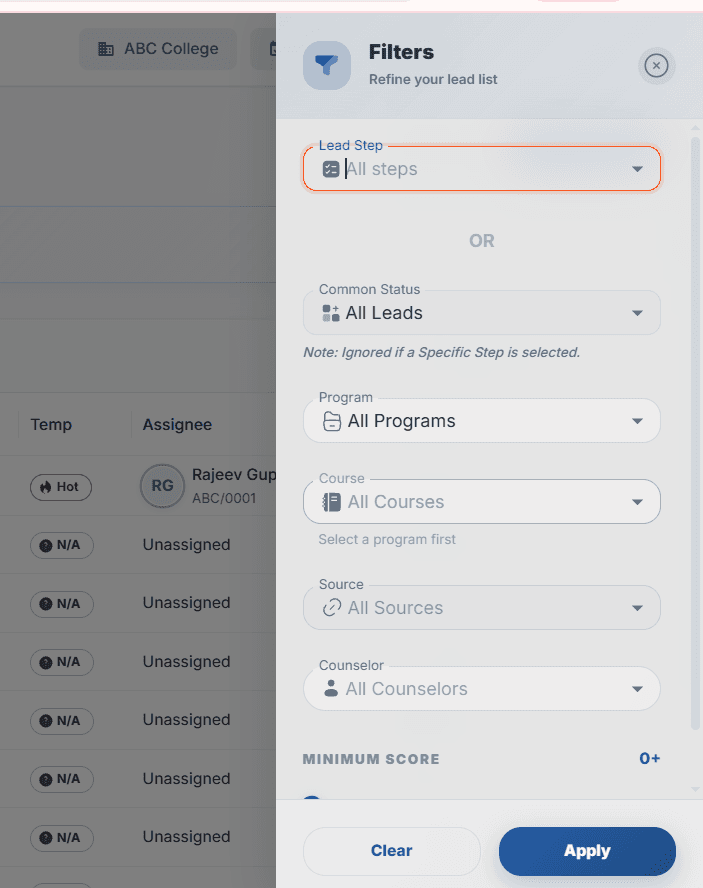
Equip admission directors with rapid search, multi-criteria filtering, and real-time reports on enquiry volumes and counsellor performance.
Key Functions:
- Instant search by student name, phone number, or email
- Filter leads by status, assigned counsellor, or course
- Course-wise and department-wise enquiry breakdown
- Lead source performance and channel volume reports
How Enquiries Flow into Verified Admissions
A structured 7-step sequence connecting the initial student touchpoint directly to application submission and registration.
Record a New Enquiry
CaptureThe enquiry is logged manually by front-desk staff during a walk-in/phone call or captured directly through website forms.
Capture Prospective Student Interests
ProfileStaff record the applicant’s target course, department, quota category, and prior qualifying academic background.
Assign an Owner or Counsellor
RoutingThe enquiry is assigned to a designated counsellor based on course expertise or admission desk responsibility.
Record Contact & Follow-Up Activity
CounsellingThe counsellor contacts the candidate, logs discussion notes, assesses enrollment intent, and schedules callback dates.
Update Lead Pipeline Status
StatusStaff advance the candidate’s status (e.g., from In Follow-Up to Application Started) as interest solidifies.
Initiate Application or Registration
RegistrationThe applicant completes the official digital or paper application form, uploading certificates for verification.
Track Admission & Fee Handover
HandoverUpon document clearance, the applicant pays the seat reservation deposit, transitioning their profile into the student ledger.
The Illustrative Admission Conversion Funnel
A clearly structured operational model showing how prospective student enquiries transition through counselling into verified institutional enrollments.
Stage 1: Multi-Channel Inquiries Captured
(100% Volume Baseline)Enquiries recorded from website forms, walk-ins, and education fairs with structured source tracking.
Stage 2: Contacted & Counsellor Assigned
(Outreach Follow-up)Structured assignment to course counsellors with callback logs, interaction notes, and scheduled follow-up tracking.
Stage 3: High-Intent Counselling & Campus Visit
(~45% Qualified Prospects)Prospects evaluated against academic eligibility, course quotas, and fee concession criteria during detailed consultations.
Stage 4: Application & Documents Filed
(~28% Active Applicants)Candidates complete the digital applicant portal form, upload mandatory qualifying certificates, and pay application processing fees.
Stage 5: Verified & Confirmed Admission
(~18–22% Confirmed Seats)Certificates verified by admission committee, provisional seat locked, and registration deposit credited directly into the institutional fee ledger.
Why Generic CRMs Fall Short for Educational Institutions
Generic sales CRMs treat prospective students as corporate sales deals. CampusIRIS is purpose-built around academic sessions, student intake quotas, and multi-tier fee structures.
Designed for B2B Corporate Pipelines
- Treats applications as one-off deals, lacking concepts of academic sessions, course batches, and intake quotas.
- No native applicant self-service portal or document upload vault for marksheets and category certificates.
- Requires separate custom software and manual CSV exporting to transfer confirmed students into the fee ledger.
- Lacks parent/guardian relational contact hierarchies and course-specific scholarship concession workflows.
Built Exclusively for Indian Education
- Native alignment with academic years, degree programs, sanctioned quota caps, and batch schedules.
- Integrated online Applicant Portal where students upload qualifying marksheets and track review milestones.
- Confirmed seat bookings instantly generate student profiles in the Academic register and create fee ledgers.
- Online payment links for registration deposits with verified PayU payment gateway integration.
Lead Management Tailored to Your Institution
Whether handling undergraduate college quotas, K–12 school registrations, or fast-paced coaching enrollments, CampusIRIS adapts to your intake model.
Degree Program Enquiries & Quota Routing
Manage inquiries across multiple degree programs (Engineering, Management, Arts, Science). Allocate leads to specialized course counsellors, monitor merit versus management quota intent, and transition admitted students into registrar batches.
Operational Highlights:
- Course and department-specific enquiry routing
- Management vs. merit quota interest tracking
- Counsellor calling cadences for degree programs
- Handover to semester academic rosters
Parent Enquiries & Campus Tour Workflows
Organize parent enquiry diaries, capture grade-wise admission interest, record campus tour notes, and track student registration forms from nursery through senior grades.
Operational Highlights:
- Grade-specific enquiry and registration logging
- Parent contact profiles and follow-up notes
- Campus visit and tour observation tracking
- Handover to class section allocation desks
High-Velocity Leads & Batch Scheduling
Handle intensive walk-in and campaign enquiry volumes. Route leads by target examination (JEE, NEET, Foundation), schedule rapid counsellor follow-ups, and allocate confirmed candidates to morning or evening batches.
Operational Highlights:
- Rapid inquiry capture for walk-ins and phone calls
- Target exam stream tagging (JEE, NEET, CUET)
- Intensive counsellor follow-up alert queues
- Direct mapping to classroom batch schedules
Built for Every Member of the Admissions Team
CampusIRIS provides tailored interfaces and role-controlled permissions so each stakeholder can focus on their specific operational responsibilities.
Complete Pipeline Transparency
Monitor live enquiry counts, lead distribution across counsellors, follow-up compliance, and pipeline progression without relying on manual status meetings.
Prioritized Calling Queues & Notes
Work through an organized daily calling queue with instant access to candidate background notes, scheduled callback alerts, and conversation history.
Rapid Inquiry Entry & Seamless Handover
Log front-desk walk-in enquiries quickly, verify candidate details, and transition qualified applicants directly into the registration and verification stages.
Actionable Intake & Source Reports
Review verified reports on enquiry volumes by academic course, marketing source performance, and intake velocity across campuses.
Connect Leads to the Broader CampusIRIS Platform
Lead management is just the starting point. Seamlessly transition prospective students into downstream admission, fee, academic, and communication workflows.
Admissions Management
Transition qualified enquiry records directly into digital application review, document verification, and seat allocation desks.
Finance & Fee Management
Attach admission fee deposits or registration charges to confirmed applicants, generating official receipts that credit the student ledger.
Academics & Student Management
Transfer confirmed applicant profiles directly into academic registrar databases, class rosters, and timetable batch assignments.
Communications Hub
Manage admission circulars, email updates, and applicant notices through our connected Email Communication Centre.
Frequently Asked Questions About Enquiry & Lead Management
Clear, grounded answers addressing enquiry capture, counsellor follow-ups, pipeline tracking, and system connections.
Explore Admissions & Connected Institutional Solutions
CampusIRIS powers diverse institutional formats. Explore the parent admissions platform or view solutions tailored for colleges, schools, and coaching centres.
- Admissions Management Hub
Central admissions platform covering applications, verification, and fee desks.
- Finance & Fee Management
Student fee ledgers, installment schedules, and receipt generation.
- Academics & Student Management
Course curricula, batch allocations, and student records.
- Communication Hub
Institutional email communications and official notices for applicants.
Bring Structure to Your Admission Pipeline.
See how CampusIRIS can help your team organize prospective student enquiries, counsellor follow-ups, and admission progress.